Book a demo

PARTNERS / SNOWFLAKE

AtScale and Snowflake: your metrics, computed in Snowflake.

Define your metrics once, in Snowflake Semantic Views or in AtScale, and serve them live to Power BI, Excel, Tableau, Looker and AI agents. Every query runs on Snowflake compute, and nothing gets copied out. Snowflake also chose AtScale to power the XMLA Endpoint for Snowflake Semantic Views.

THE CHALLENGE

You define gross margin once, in a Snowflake Semantic View, and Cortex Analyst and Snowflake Intelligence answer from it. Power BI and Excel can’t read Semantic Views live, so teams import the data, mirror it to Fabric or rebuild the logic in DAX. Soon the agent and the dashboard disagree, and the compute has left Snowflake.

WHAT YOU GET

One governed definition, served to every tool and agent and computed in Snowflake.

Start with Semantic Views. The XMLA Endpoint brings them live to Power BI and Excel. Extend with AtScale Enterprise. The same definitions reach Tableau, Looker, AI agents over MCP and other engines.

Either way, Snowflake governs access and runs every query.

SEE IT IN SNOWFLAKE

Watch a metric resolve to columns, then run where the data already is.

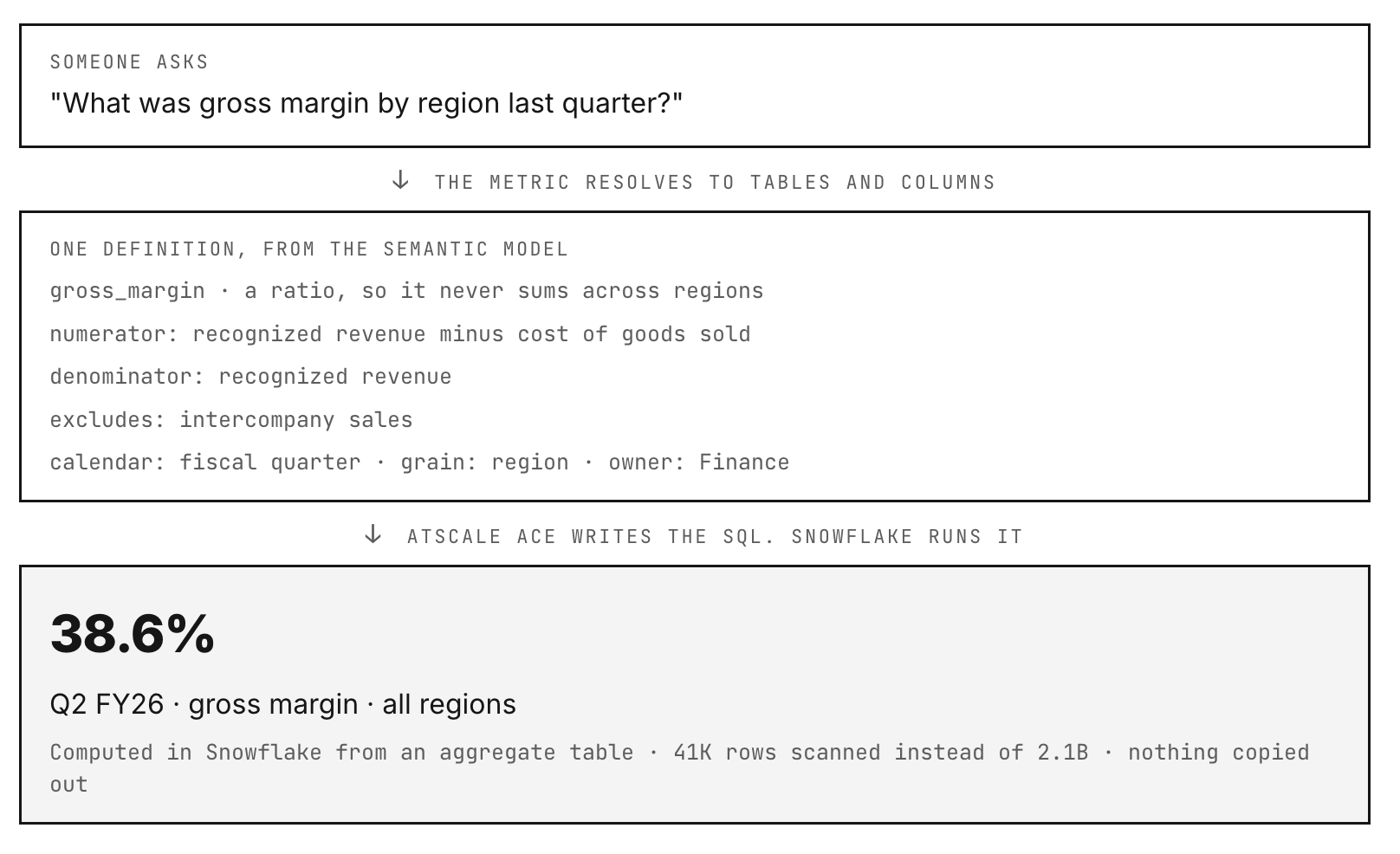
A question arrives in plain language. AtScale finds the one modeled metric that answers it and shows how it resolves: the tables, the columns, the filters and the grain. AtScale ACE (the AI Computation Engine) writes the SQL, and Snowflake runs it.

Someone asks: What was gross margin by region last quarter? The metric resolves to tables and columns. One definition, from the semantic model: gross_margin is a ratio, so it never sums across regions; numerator: recognized revenue minus cost of goods sold; denominator: recognized revenue; excludes intercompany sales; calendar: fiscal quarter; grain: region; owner: Finance. AtScale ACE writes the SQL. Snowflake runs it: 38.6%, Q2 FY26, gross margin, all regions. Computed in Snowflake from an aggregate table, 41K rows scanned instead of 2.1B, nothing copied out. Illustrative example.

WHAT IT DOES

Your margin rules live in one model, and Snowflake does the computing.

Which costs belong in margin, whether intercompany sales count and how a ratio rolls up across regions are decisions Finance made once. None of them are in the schema, so every tool that reads the tables makes them again.

AtScale’s semantic model keeps those decisions in one place, and ACE compiles every request into SQL that runs in Snowflake. Your data doesn’t leave your account, your roles and row access policies still apply, and you can read the query the warehouse runs.

Snowflake chose AtScale as the computation engine behind its XMLA Endpoint for Snowflake Semantic Views, which brings certified Snowflake metrics to Power BI and Excel.

AtScale Enterprise for Snowflake runs as a Snowflake Native App on Snowpark Container Services and is billed through Snowflake. Every query it compiles runs on your Snowflake credits, and the aggregates it builds stay in your account.

HOW IT CONNECTS

Setup takes four steps, and your data stays in your account.

01

Point AtScale at Snowflake

It’s one connection to your account, with no agent to install beside it.

02

Keep your access model

AtScale queries as the person asking, so the Snowflake roles and row access policies you’ve set still apply.

03

Model the metrics once

Definitions live in code, so they’re versioned and reviewed like any other change.

04

Let ACE write the SQL

Aggregates are built and refreshed inside your account, and each query takes the cheapest correct path.

MORE WAYS TO USE IT

What else a Snowflake team gets.

Fast dashboards on live data

AtScale’s ACE optimizer builds, maintains and retires aggregates in Snowflake, with up to 14x higher concurrency.

A way off SSAS

A cloud-native replacement for SQL Server Analysis Services cubes and legacy OLAP, on Snowflake compute.

Cortex and Power BI agree

Snowflake Intelligence, Cortex Analyst, Power BI and Excel all read the same definitions.

Your governance, unchanged

Snowflake RBAC, row access policies and column masking apply to every Power BI and Excel query.

No second copy to secure

There’s nothing extra to protect or reconcile.

Power BI and Excel on Semantic Views

The XMLA endpoint lets business users work in the tools they already know.

FAQ

Questions we hear.

Does AtScale copy data out of Snowflake?

No. ACE (the AI Computation Engine) compiles each request into SQL that runs in your Snowflake account, and the aggregate tables it builds live there too.

How does AtScale work with Snowflake Semantic Views?

Snowflake chose AtScale as the computation engine behind the XMLA Endpoint for Snowflake Semantic Views, so Power BI and Excel can query the metrics you define in Snowflake.

Who controls access?

Snowflake does. AtScale queries as the person asking, so the roles and row access policies you’ve already set apply to every answer.

Does it make dashboards faster?

Yes. ACE answers from an aggregate table when one fits, so a refresh doesn’t scan the fact table. Aggregates are built from the questions people ask and retired when they stop getting used.

Which BI and AI tools can use the same metrics?

Power BI and Excel connect live over XMLA, Tableau and Looker connect through AtScale’s PostgreSQL interface, and Python notebooks use AI-Link. Claude, ChatGPT and Google Gemini connect over the AtScale MCP server. They all get the same gross margin.

Book a workshop.

  • Bring us your most controversial metric and the business questions your team and your agents ask about it every week.
  • We benchmark your AI on them, with AtScale and without it.
  • You keep the semantic model we built to run the test.

Meet AtScale.